
Does Your Agency Need ADA Remediation? Triage Your Documents First
Maybe your agency’s position on ADA Title II is that you don’t have a problem, or that your website vendor has you covered. Either may be true, but neither is known until someone looks at the documents themselves, the PDFs, Word files, and spreadsheets staff have posted over the years, and asks of each whether it has to be fixed.
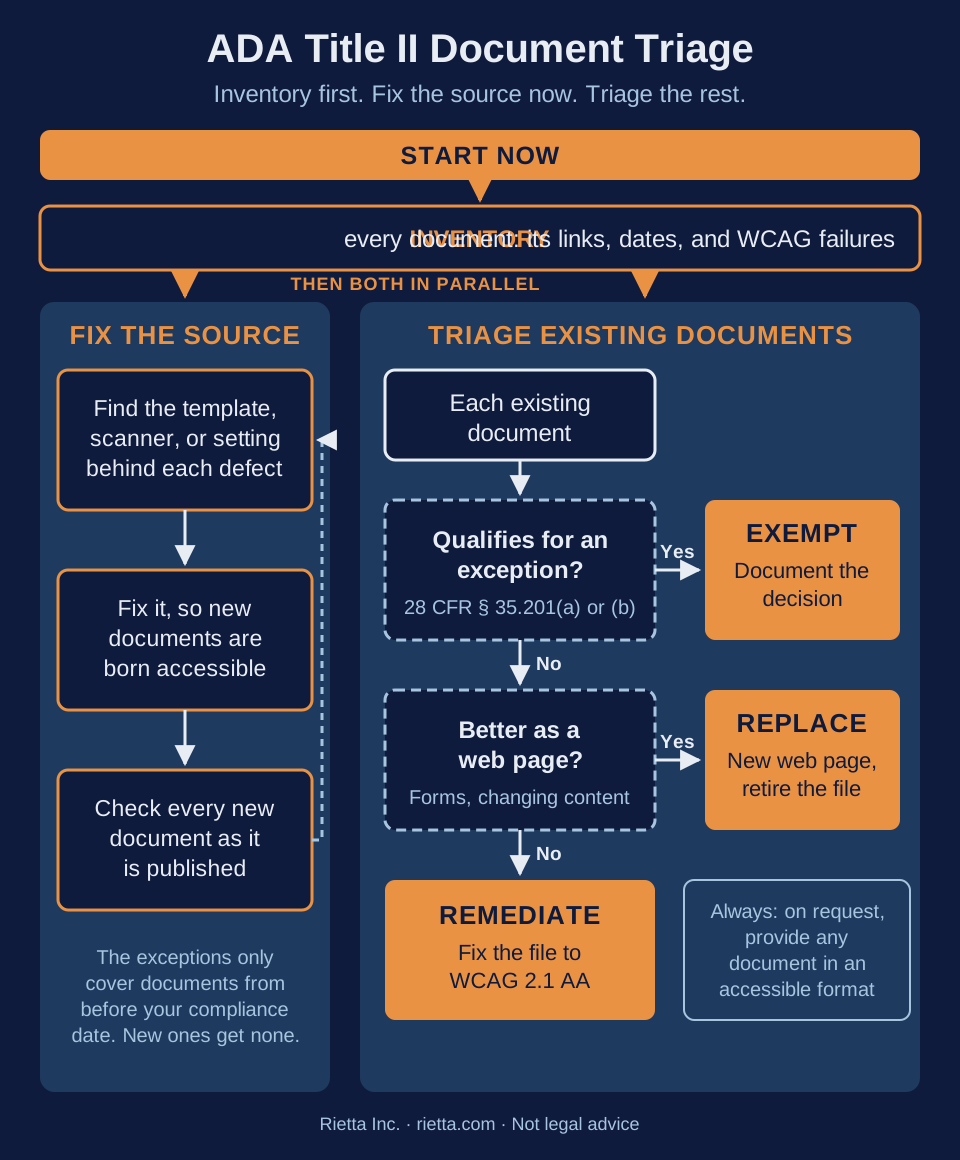
The bottom line: some of them will, but rarely all of them. The ADA Title II rule has two exceptions that can take older documents out of scope, some documents are better replaced with a web page, and most defects trace back to a few templates and workflows that will keep producing new ones. Five steps, the first two starting now:
- Inventory every document you have posted, where it is linked from, its dates, and its accessibility failures under the WCAG rules.
- Fix the source. Correct the templates, scanner settings, and publishing steps that create inaccessible documents, and keep at it, because your agency keeps publishing.
- Exempt what qualifies for an exception, and document why.
- Replace content that works better as an accessible web page, and retire the file.
- Remediate what’s left to the WCAG rules, specifically WCAG 2.1 Level AA, the standard the Title II rule adopted.
The compliance date is April 26, 2027 for state and local governments with a population of 50,000 or more, and April 26, 2028 for smaller governments and special district governments, under the April 2026 extension of the Title II compliance dates. The National Federation of the Blind has sued to set that extension aside, so I would not plan on more time. More on the dates in The Real ADA Title II Deadline for Government Documents.
If Your Vendor Says You’re Covered
If a website platform vendor handles your accessibility, ask two questions: does their coverage include the documents your staff upload, not only the pages their platform builds, and do they check those documents across the whole corpus rather than one at a time?
An accessibility overlay, a script that adjusts web pages in the visitor’s browser, is seldom a full solution, and it never reaches your PDFs. The Overlay Fact Sheet, signed by about a thousand accessibility practitioners, says “no overlay product on the market can cause a website to become fully compliant with any existing accessibility standard,” and warns that “overlays themselves may have accessibility problems significant enough for users to take steps to actively block” them. In 2025, the Federal Trade Commission required overlay vendor accessiBe to pay $1 million and barred it from claiming its automated products can make any website WCAG compliant without evidence to support the claim.
Inventory First
You can’t triage what you haven’t counted and checked. For each document, record its file type, every page that links to it, the dates in its metadata and on its face, and whether anyone still uses it to reach a service. Then review it for deficiencies under the WCAG rules, WCAG 2.1 Level AA, a set of testable success criteria. For a PDF that includes things a reader never sees, like a document title and a defined language in its metadata, which a screen reader needs to announce and read it correctly. Include files that no page links to anymore, which may still be reachable by a direct link or a search engine. This is your document corpus, and the evidence behind every decision that follows: the failures show where to fix the source, and which documents need work at all.
Fix the Source, Starting Now
The exceptions only look backward. Both depend on a document predating your compliance date, so every document published after it gets no exception at all. If the same template or scanner profile is still producing untitled, untagged PDFs, you are remediating a pile that keeps growing.
Inaccessible documents tend to share a common ancestor. When a department’s PDFs all lack a title or a defined language, that usually points to one Word template, one copier’s scan-to-PDF profile, or one content management system setting. Tracing a defect to its source is called document provenance, which I covered in Document Provenance: Finding the Common Ancestor of Inaccessible Documents. Your old, excepted files are often the best evidence of where those defects come from.
Exempt: What the Rule Doesn’t Require You to Fix
28 CFR § 35.201 sets out two exceptions:
Preexisting conventional electronic documents is the broader exception, and usually where most of an older corpus belongs. It covers PDFs, word processor files, presentations, and spreadsheets posted before your compliance date, “unless such documents are currently used to apply for, gain access to, or participate in the public entity’s services, programs, or activities.” What matters is current use, not age. A city’s superseded 2019 budget, rescanned in 2023, is a good candidate, because no resident uses it to reach a service today. A 2018 homestead exemption application linked from the live tax office page is not, however old it is.
Its metadata says 2023, the scan date, while the clerk’s file stamp says November 2019, which is why a file’s own date can’t be trusted. Our TrueDate™ analysis corroborates date evidence from a document’s text, its visual content, and its metadata into a best supported date for a person to confirm.
Archived web content is narrower. Under 28 CFR § 35.104, all four conditions must hold:
- Created before your compliance date, or reproducing a paper document or other physical media created before it.
- Retained exclusively for reference, research, or recordkeeping.
- Not altered or updated after the date of archiving.
- Organized and stored in a dedicated area or areas clearly identified as being archived.
The fourth condition is about the web page, not the file, and it is the one most often missed. Commenters asked that content be “individually marked as archived regardless of where it is posted,” and the Department “decided not to change the fourth part of the definition,” per the section-by-section analysis in Appendix D to Part 35. A hidden flag in your content management system doesn’t qualify, though a clearly identified section of a page can. So the linking page is a gatekeeper: labeling one page as an archive can settle the status of every document it links to, a web development task rather than a remediation task. Our TrueContext™ analysis checks linking pages for that evidence.
Document every decision, and keep a way to say yes. Record the exception relied on, the date and its evidence, the current-use call, and who decided. Whether a document qualifies is a legal determination for your agency and its counsel; see when to involve legal counsel in an ADA/WCAG audit. An exception also doesn’t end your obligation to a person who needs the document. The DOJ’s fact sheet on the web and mobile app rule says a government “would likely still need to provide the content to a person with a disability who needs it in a format that is accessible to them.” An accommodation workflow, like the one I described in the real Title II deadline post for a client with thousands of PDFs, is what makes relying on the exceptions defensible.
Replace: When a Web Page Beats a PDF
Content that changes often or that people act on, like a fee schedule, a meeting calendar, or a fillable form, is usually easier to keep accessible as a web page than as a PDF fixed again with every revision. The page must meet the same WCAG rules, but it is fixed once and is easier to maintain.
Remediate: What’s Left
The remaining documents are in scope and need to stay documents, so the failures found in your inventory get fixed to WCAG 2.1 Level AA. There are many good remediation vendors. If you get a remediation quote priced per document, triage first, so you are paying for fewer files.
Check their work corpus-wide, not one document at a time. One pattern I have seen after remediation is a vendor stamping every document with the exact same title, as I described in the real Title II deadline post. Each file passes on its own, but a screen reader user can’t tell them apart in a list of downloads. More examples are in Real ADA Title II Findings for Government Documents. Independent review of that work should carry more weight than the vendor’s self-attestation.
Our ADA/WCAG document accessibility audits for government do this triage across your whole document corpus, powered by our Metadata Minder platform, with fixed-price tiers. You can also schedule a free 30-minute scoping call. Rietta is not a law firm, and this post is not legal advice.
References
- 28 CFR § 35.201 Exceptions, Legal Information Institute, Cornell Law School. Retrieved October 15, 2026.
- 28 CFR § 35.104 Definitions, Legal Information Institute, Cornell Law School. Retrieved September 23, 2026.
- Appendix D to Part 35, Guidance to Revisions to ADA Title II Regulation on Accessibility of Web Information and Services of State and Local Government Entities, Legal Information Institute, Cornell Law School. Retrieved October 15, 2026.
- Fact Sheet: New Rule on the Accessibility of Web Content and Mobile Apps Provided by State and Local Governments, U.S. Department of Justice, ADA.gov. Retrieved October 15, 2026.
- Extension of Compliance Dates for Nondiscrimination on the Basis of Disability; Accessibility of Web Information and Services of State and Local Government Entities, Federal Register, April 20, 2026. Retrieved September 24, 2026.
- Overlay Fact Sheet, Overlay Fact Sheet signatories. Retrieved October 15, 2026.
- FTC Approves Final Order Requiring accessiBe to Pay $1 Million, U.S. Federal Trade Commission, April 2025. Retrieved October 15, 2026.
- National Federation of the Blind Challenges Last-Minute Deadline Extensions for Website and Mobile App Accessibility, Seyfarth Shaw LLP. Retrieved October 1, 2026.