
Document Provenance: Finding the Common Ancestor of Inaccessible Documents
We built our Metadata Minder platform to identify inaccessible documents with ADA/WCAG deficiencies that prevent them from being compliant. Much of the industry was focused on scanning and fixing websites, so we focused on documents instead and the results are eye-opening. The platform reads files, extracts metadata, and analyzes both structure and content. We even support very old formats going back to the 1990s including old-style Word documents and the occasional WordPerfect document.
As we began to look at document metadata and compliance at the corpus level, we observed that flagged documents often share a common ancestor. The same business process produced them, over and over. I have started calling this a document’s provenance, the specific business process, template, and tool that produced it, the same way you’d trace a piece of art or a line of code back to where it actually came from.
In hindsight this is nearly self-evident that governments have many templates both organized and ad hoc among their various offices and functions. Seldom does a staff member or an elected official just pick up and draft a document from scratch. Additionally, there is a technological provenance behind how files get post processed. For example, we have seen many open source and proprietary technologies leaving metadata stamps on files published on the web. These include various versions of iText, Adobe products, and a plethora of others that are not household names. Typically they are providing optical character recognition or other document processing/compression. However, often these tools were not designed to produce accessible documents under the requirements of the WCAG standards mandated by the ADA. This lines up with independent academic research too. A 2024 study analyzing 20,000 scholarly PDFs found real associations between the software platform used to create a document and whether it met accessibility criteria (Kumar and Wang, Uncovering the New Accessibility Crisis in Scholarly PDFs, ACM SIGACCESS ASSETS ‘24).
Some examples include, but are not limited to:
- a current document for an active program is authored in WordPerfect (or Microsoft Word), printed to file in Windows, a step that stamps the Title with the non-descriptive default filename unless someone edits it afterward, processed by a third party PDF enhancer, and then published.
- a court ruling is drafted, printed, signed by the judge, scanned, and uploaded to a case management system without any edits made to the metadata.
- a document is scanned, post processed by OCR, run through a very old, out-of-support, iText version and published to the website.
The point is none of these are just one-offs, but instead the result of a workflow. A traditional remediation approach may be to slap a PDF overlay on it or use AI chat to assist someone trying to interact with the document. But the agency will keep producing inaccessible files, over and over again, into the future unless the source is fixed.
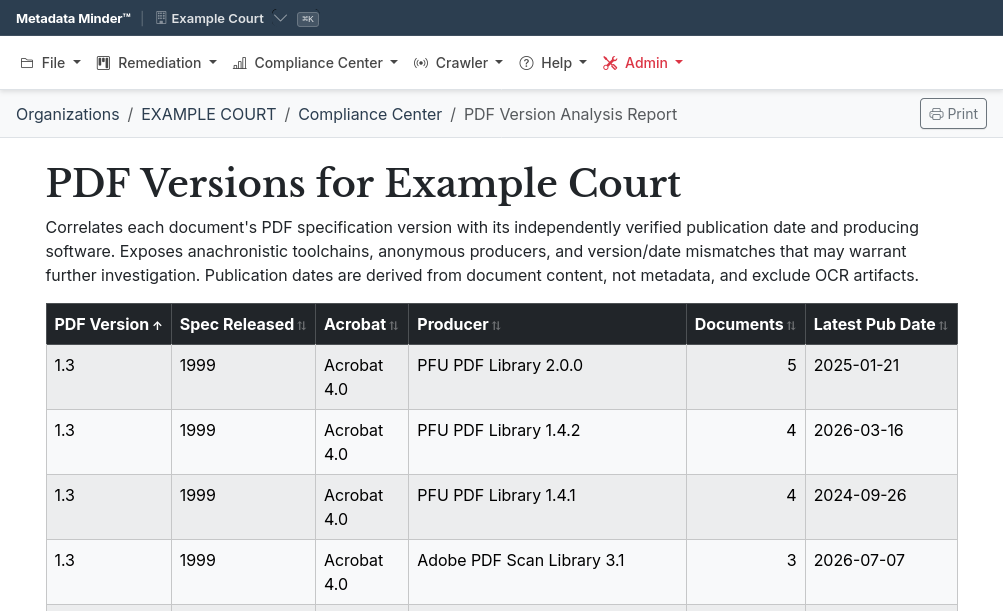
This is why our reports highlight the software versions and tools that touch files. They can highlight the different workflows that are present in production within the agency. And don’t forget sometimes a PDF using an ancient out-of-support standard is published new in 2026 because somewhere there is a piece of hardware still in use. In the cover image for this article, the three top lines are all versions of PFU PDF Library that are associated with scanner hardware by Ricoh Company, Ltd. From audits we have performed, there are often PDF Version 1.3, a standard released with Adobe Acrobat 4 in 1999, still being published now via producers such as “Adobe PDF Scan Library 3.1” or “Foxit PDF for .NET SDK v3.0.0.40 (Build 35616)”. These are out there and something that our ADA/WCAG Document Accessibility Audit report will highlight for you.
For many organizations, identifying the document sources is a critical step. You can then go back and implement accessible templates, that make full use of the accessibility features of the software you are already using, and start to produce documents that are accessible in the first place. That is a win for the public and a win for the agency too.
If you want to go deeper into understanding the ADA/WCAG risk then see my July article on Threat Modeling for ADA/WCAG Compliance.