
Real ADA Title II Findings for Government Documents
I recently wrote about the upcoming ADA Title II deadline for governments with 50k or more residents in their jurisdiction.
Overview
As we continue to work with Government organizations, Rietta is providing plain language reporting on the issues in our ADA/WCAG document accessibility audits, tying them directly back to the requirements. Our reports cover a lot of ground, some of which is not talked about in accessibility circles quite enough. For example, we have a very strong argument that using the same title over and over again is not compliant even though accessibility vendors will do that as they seem to be looking at documents one at a time and not corpus wide. This is a generalized statement based on particular observations. We are not casting doubt on any particular vendor.
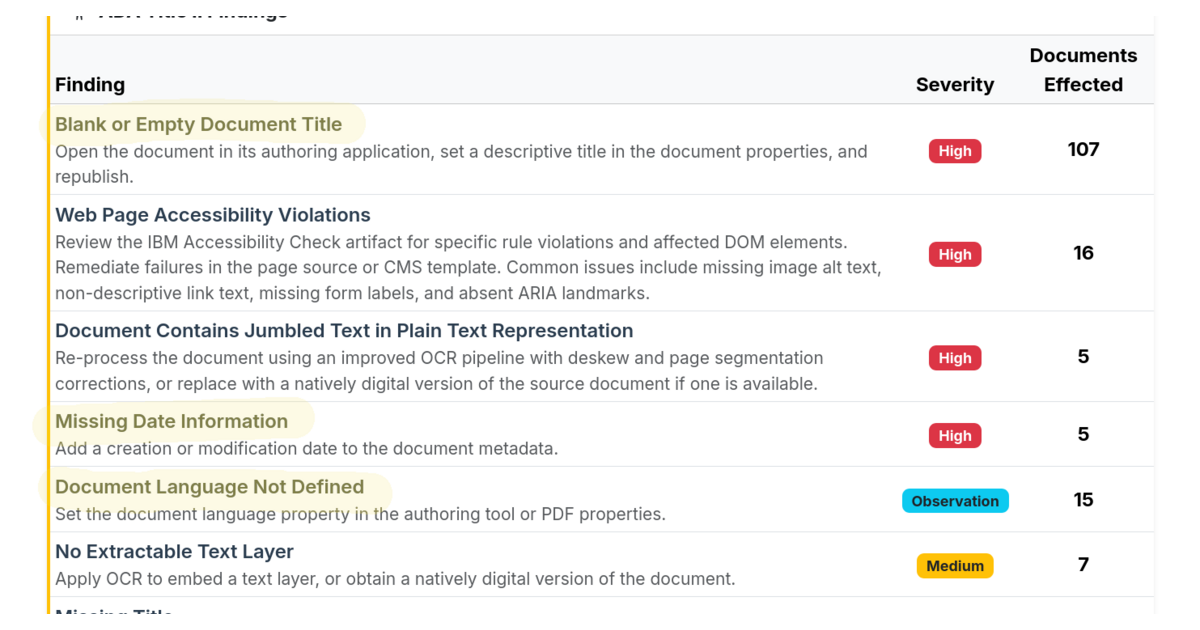
Many a blog post will tell you about your ALT text for images, which you should do. But today, I want to share with you the three most critical metadata-based, as opposed to content-based deficiencies, we are seeing with documents (PDFs, Word, Excel, etc., hosted on government sites):
- Blank or Empty Document Title
- Missing Date Information
- Document Language Not Defined
For each of these, I am sharing a snippet from the guidance library we have developed for the tool.
1. Blank or Empty Document Title
No title field was found in the document’s metadata. WCAG 2.4.2 Page Titled requires that documents have titles that describe their topic or purpose, and for PDFs specifically, the PDF18 technique is what defines setting that title in the document properties dictionary as sufficient to meet it. Screen reader users rely on the document title to orient themselves and confirm they have opened the right file. Browsers and PDF viewers display the metadata title in the title bar and tab, so without it, users see only a file name or nothing at all.
The title should be descriptive, that is state the subject, not just the document type. “2024 Annual Water Quality Report” is correct. “Report” is not.
And technically a separate finding, but non-descriptive titles are also a huge blocker for accessibility. When you present dozens of identically titled documents to a user who depends on a screen reader, it becomes hard or impossible for that person to understand clearly which document is which. With Metadata Minder™ we give you three freebies before the tool starts flagging every identically titled document as having an accessibility problem.
2. Missing Date Information
Metadata Minder™ looks for a document date in multiple places: PDF metadata fields (CreationDate, ModDate), XMP properties, visible text (cover pages, footers, headers), and image OCR. When none of these sources yields a usable date, the document is flagged. This matters beyond metadata hygiene as the archival exemption requires establishing that a document predates the ADA Title II compliance date. An undated document cannot make that case and therefore must be fully remediated or replaced.
3. Document Language Not Defined
The PDF metadata contains no Lang entry. Screen readers use this attribute to automatically switch to the appropriate text-to-speech voice, and an English document read with a French voice profile produces garbled or incomprehensible output. This is a quick fix with high accessibility impact.
Conclusion
At the end of the day, it’s your agency’s decision on how to approach the compliance challenge. In many cases, specific metadata updates may be enough to make a huge improvement in accessibility. In many cases content changes are necessary. Also there is a significant Archival exemption available under the law, but you can only claim it with accurate date information on the true date of those documents and properly worded archival sections on the pages that link to them. More on that to come.