
22 Years on Firefox, and Today I'm Finally All In

I have now committed to being all in with Firefox as my primary browser in 2026, after splitting time for the last ten years between Google Chrome as my work browser and Firefox as my testing and personal daily driver. What kept me split that long wasn’t any loyalty to Chrome, it was dread of the reorganization: two decades of bookmarks I never wanted to touch. What finally forced the issue was Google killing the ad blocker I depended on for security, combined with a passkey future closing in fast enough that staying split between two ecosystems stopped being an option. Inertia only wins until something costs more than the reorganizing does.
In this article, I am sharing some of my own personal hands-on experience merging the browsers, some bookmark management techniques, some thoughts on mandatory passkey two-factor authentication, and some memory lane of using both Firefox and a precursor to Safari’s WebKit in FreeBSD.
My Current Setup in August 2026
Consolidating into Firefox as a busy professional with multiple devices means the following:
- Firefox as my primary browser on my Linux workstation and laptop
- Firefox on my iPhone and iPad
- Firefox Sync to keep everything synchronized
- LastPass password manager with a very strong vault passphrase, 2FA, and all of the security settings tuned up.
Background Motivation
Over the last decade, my company and many of our customers have made heavy use of the Google Suite of tools. These took advantage of Chrome functionality that made using that browser as the work default desirable. Over that time I have witnessed the bulk of tutorials on browser automation, testing, and the emergence of frameworks heavily skew towards Chrome. As a matter of company policy, we have made heavy use of uBlock Origin to reduce security risk when using the Internet for work purposes. Advertisements are not necessarily malicious but this did have the impact of blocking a great deal of scam adjacent advertisements and annoyances. It made the web bearable.
Running two browsers side by side also carried its own everyday tax. Depending on which application handed off a link, whether it was an email client, Slack, or a terminal, that link would open in whichever browser the operating system considered the default, not necessarily the one I actually wanted for that task. I’d click through expecting my bookmarked context, saved logins, or a specific extension to be right there, and instead land in the other browser entirely. It was a constant, low-key barrier, and for a decade I worked around it subconsciously by just copying and pasting the URL over to the right browser rather than ever stopping to treat it as a problem worth fixing.
Google Chrome blocked uBlock Origin for the last several months and now Microsoft Edge is following suit:
Earlier this year, Google Chrome annoyed a whole lot of adblock users by killing support for Manifest V2 extensions. It’s a Manifest V3 world now, which means the permissions and APIs that thoroughgoing adblockers like uBlock Origin rely on are a thing of the past on Chrome (it’s since been replaced by a pared-down version: uBlock Origin Lite). Now, Microsoft Edge is following suit: “Over the next few months, MV2 extensions will be gradually turned off by default,” says Redmond.
All in Firefox Practical Matters
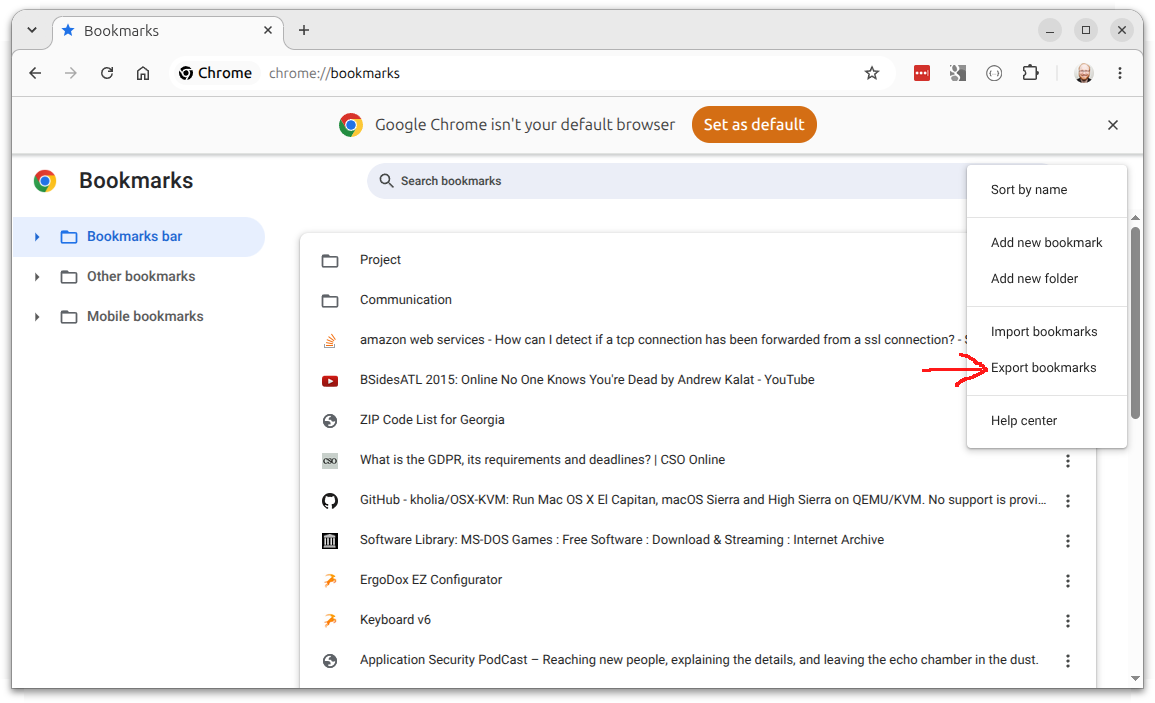
As of today, I have unpinned Google Chrome from my application launcher bar, exported my Chrome bookmarks and imported them into Firefox and am all in.
As a practical matter, Firefox on desktop is a different browser than Firefox on iOS devices, which use the Safari WebKit-based renderer. iOS doesn’t run all Firefox extensions there: uBlock Origin isn’t available, but LastPass is, and it still carries its weight for password and passkey management.
My particular setup is also being driven by the industry-wide move toward passkeys. Apple’s iCloud Keychain, the passkey store behind Safari on my iPhone and iPad, deliberately does not sync with Firefox or any non-Apple platform. That’s a strategic choice on Apple’s part, not a temporary gap. Whatever I land on has to preserve my primary machine, my Linux workstation, as the place I actually work, and a cross-platform credential manager like LastPass, not a single vendor’s walled garden, is the only way to do that without risking getting locked out in favor of a phone.
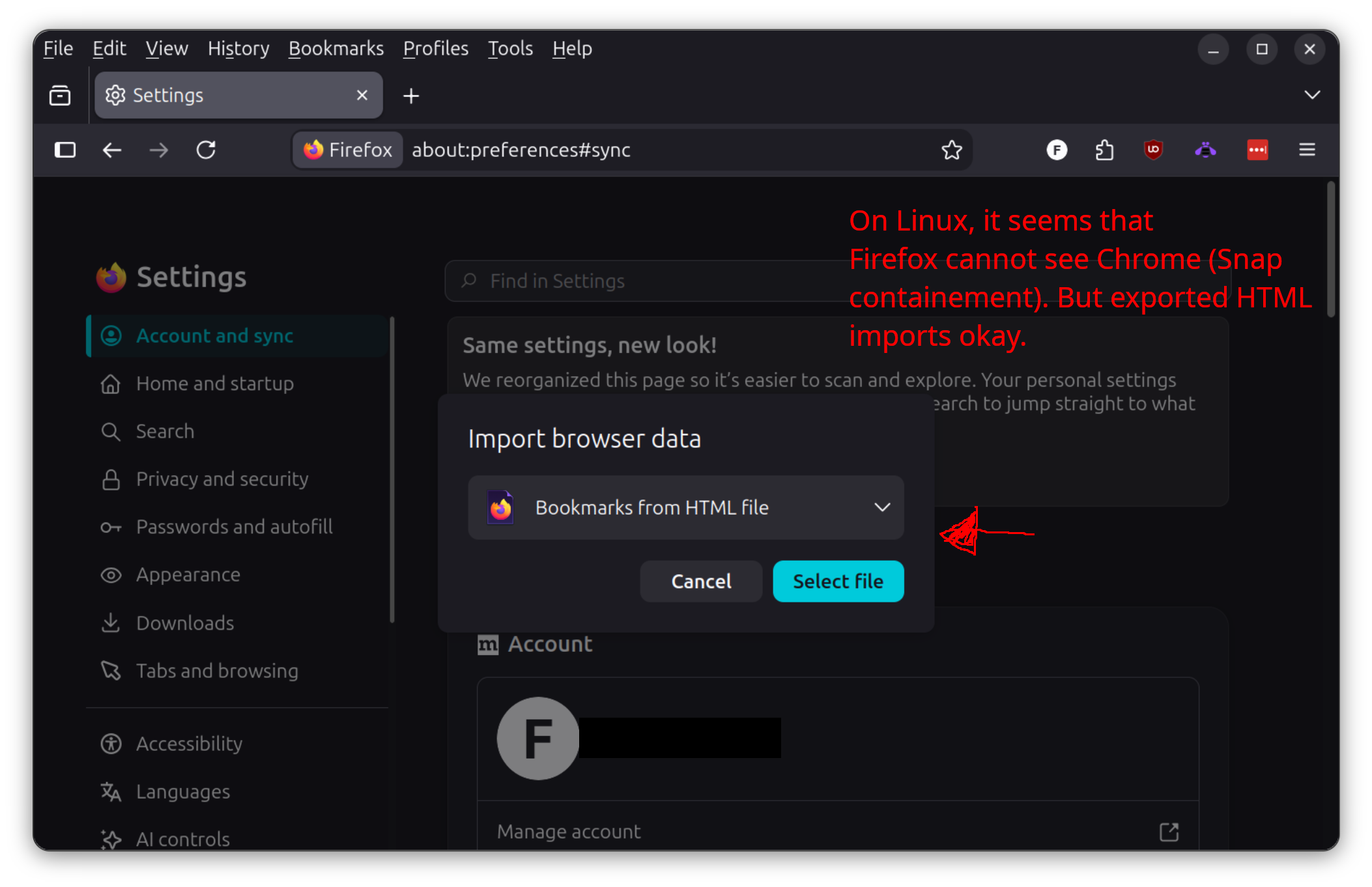
Since I have been splitting tasks between two browsers for over a decade, I needed to transfer Chrome bookmarks to Firefox. Despite what a lot of tutorials and the browser’s own import UI imply, Firefox cannot directly import bookmarks from Chrome on Ubuntu 26.04. I didn’t dig into exactly why. However, exporting to an HTML file and then importing that worked fine. The next step was to create a Sort folder to hold the junk drawer of imports and start with my new getting things done inspired top level arrangement - still a work in progress.
Basically my top level categories will be:
- Workflow & Action
- Knowledge & Research
- Tools & Process
- People
- Entertainment
- Other
I am heading this way because for me, I don’t have a clean separation between professional interests and hobby interests. If I am researching some super geeky programming topic or something related to one of my hobbies, my head-space is relatively flat. I don’t have a distinct “at work” persona versus an “expanding my skills” persona.
Looking at those six categories now that I’ve written them out, the organizing principle isn’t work versus personal at all, it’s the kind of engagement each bookmark represents. Workflow & Action is anything with a next step attached, straight out of the Getting Things Done playbook. Knowledge & Research and Tools & Process split reference material from the utilities and processes I actually rely on day to day, because looking something up and depending on it operationally are different kinds of use. People covers contacts and relationships, which cut across client work and personal life without caring which side of that line they’re on. Entertainment is the one category that’s genuinely about domain rather than function, carved out on purpose because even I need one boundary somewhere. And Other exists because forcing every bookmark into a perfect category is how organizing systems collapse; a junk drawer is a feature, not a failure.
The Transfer from Chrome to Firefox
The first step after realizing that Firefox could not see Chrome, was to export the bookmarks manually to an HTML bookmark file. This is a special HTML file that has not only the bookmark data but timestamps embedded. It’s an old standard that still works. Firefox can import it.
Then back in Firefox, I use the import bookmarks function and then select the HTML bookmark file option. It presents a dialog to open the file from disk and then processes it.
Multiple Profiles
Firefox has robust profile support which creates completely separate identities. If you have a Work profile and a Personal profile and want to sync each, you need separate Mozilla accounts for each, though. This is not the most desirable for me personally on the day-to-day. However, it is useful for having completely isolated browser instances with more fine grained control than the Private Browsing session (Firefox’s equivalent to Incognito).
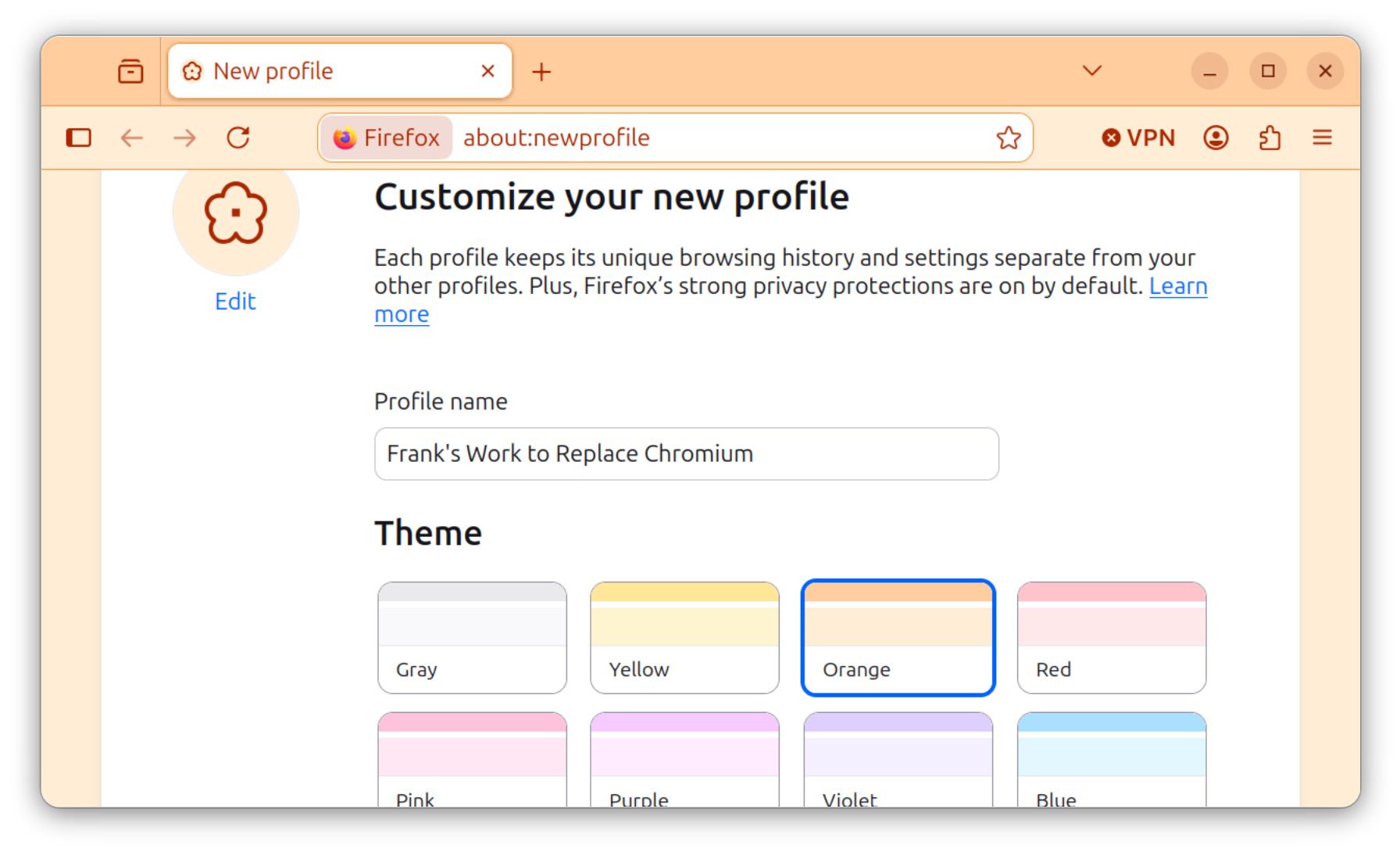
For me, I prefer to have a unified bookmark setup for the whole of my professional life and my academic pursuits. I don’t have time or energy to do much else. I do really like having stable research profiles though when working on specific cybersecurity tasks. That is very handy.
Looking Back at the Browser Wars
I have been a long time user of many browsers going all the way back to the 1990s. I distinctly remember the day, March 31, 1998, when Netscape actually released its source code onto the Internet, an event Mozilla’s own 20th-anniversary retrospective recounts in detail, because I was a home school student staying overnight at a university campus and was able to download it on their super fast connection vs days and days of my parents’ 10 hour a month AOL dialup. That’s over 28 years now of that same codebase living on as open source, continuously maintained through its Firefox lineage by a community of contributors, right up to the browser I’m typing this post in today.
My own personal history with it goes back nearly as far, though the specifics have gone fuzzy with time. I was a computer science student at Georgia Tech running Netscape Communicator, a name most of today’s developers have never even heard of, and somewhere in that same era I picked up the browser that would go on to become Firefox, first released as Phoenix in September 2002 before a trademark dispute forced the renames to Firebird and then, in February 2004, to Firefox. Counting conservatively from that 2004 rename, this makes 2026 my 22nd year on the browser. You can even catch a glimpse of both KDE Konqueror (a precursor to the WebKit/Safari) and Firefox icons on a screenshot of my FreeBSD+KDE desktop from back then, and the once very popular Firefox extension development tutorial (2005) I wrote with my Georgia Tech classmates for an official group class project.
Browsers change popularity and for the last decade Google Chrome and the underlying Chromium project have taken the lead. But the browser in the lead always seems to start behaving strangely once winning stops feeling urgent. Microsoft did the same thing with Internet Explorer back when it held the dominant market share: innovation stalled, IE-only quirks fragmented the web, and it took years of user frustration before anything changed. Chromium’s Manifest V3 push, which is what killed uBlock Origin’s full capabilities as cited above, reads like the same instinct: fewer options for the user, more control for the vendor, because there’s nowhere else for most people to go. Human nature seldom changes.
Open Questions
While I have avoided browser-based passkeys so far, preferring the Yubikey, the window is being forced closed by big tech. I need to ensure I can authenticate both with my primary workstation and iOS and not be locked out because of device switching. It will be unacceptable to be locked into Apple’s ecosystem for something this critical. I will be generating my first passkeys within the coming weeks.
Big tech is going all in on passkeys, and I suspect vendor lock-in is at least part of the motivation, not just security. Google Ads now requires a passkey for sensitive account actions, and I expect that pattern to spread to more Google services. Passkey signup flows themselves already warn you to only enroll a device that’s truly yours to keep, which tells you the platforms already know what happens when it isn’t: get a new phone, and you can be locked out of your own account. Recovery paths exist on paper, but in two decades of doing this professionally, my experience is that almost nobody actually saves their one-time recovery codes properly. When I enroll in a traditional TOTP-based 2FA, I print the enrollment barcode and lock it in a physical bank safe deposit box, an offline backup that has nothing to do with any device I own. Passkeys don’t have an equivalent: the credential is bound to a device or a platform’s cloud account, not something you can print and put in a drawer. At scale, that gap is going to be a real problem, especially for people far less comfortable with this technology than the readers of a cybersecurity blog. That’s a big enough topic that it deserves its own post.
Conclusions
This means for me two decades of bookmarks finally merged into one place, a real decision forced by where passkeys are headed, and a browser history that goes all the way back to Netscape’s source code, Phoenix, and my own FreeBSD desktop twenty-one years ago, before iOS even existed.
This goes beyond my own personal workstation. At Rietta, we’re working to get Google Chrome out of our infrastructure wherever it still shows up, including in headless environments with no keyboard or monitor at all. We’ll be writing soon about running Firefox ESR on Debian Trixie as our own screenshotting service and for Selenium-driven automated testing, the same shift away from Chrome dependence that started with my own workstation, just running unattended on a server instead.
There’s also a licensing angle that matters more than most people give it credit for. Firefox runs on the Mozilla Public License 2.0, a genuinely business-friendly, file-level copyleft. Chromium’s own code is BSD-licensed, but that openness doesn’t extend to Google Chrome itself, and it hasn’t stopped Google from unilaterally cutting off API access that competing Chromium-based browsers had relied on for years. That gap between the two ecosystems is a bigger deal than most people give it credit for, and it deserves a longer post of its own.
If you’re weighing the same kind of platform lock-in I described above, I’d like to hear about it: what browser you landed on, whether your password manager is cross-platform or tied to one vendor, and how you’re planning to handle passkeys before you’re forced into it.